FreeClipboard history that never touches the disk
A free clipboard manager for Mac as an alternative to Maccy
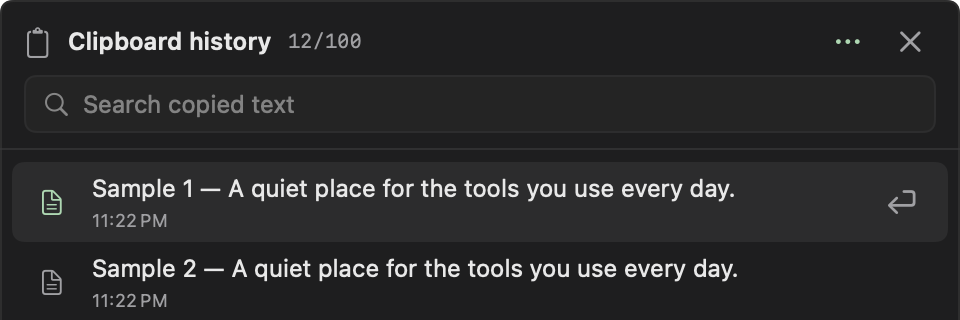
Frog’s clipboard history keeps the last 100 copied text items while it is on and pastes any of them back with Shift–Command–V. History stays in memory, never on disk, and copied passwords and keys start hidden. It comes with Frog, a free, open-source menu-bar toolkit for Mac.
- 100recent text items, searchable from Shift–Command–V.
- 0 byteswritten to disk: history lives in memory only.
- HiddenPasswords, tokens and keys start masked.
Frog vs Maccy vs Paste
Three ways to get your clipboard back: minimal, memory-only, or synced everywhere.
| Feature | FrogFree | MaccyFree, $9.99 on the App Store | Paste$29.99/yr |
|---|---|---|---|
| Price | Yes: Free | Yes: Free from GitHub | No: $2.49/mo or $29.99/yr |
| Open source | Yes: MIT | Yes: MIT | No: No |
| Search and paste from the keyboard | Yes: Shift–Command–V | Yes: Yes | Yes: Yes |
| History kept on disk | Yes: Never, memory only | Partly: Yes, between launches | Partly: Yes, synced |
| Secrets masked automatically | Yes: Keys, tokens, passwords | Partly: Skips concealed items | Not stated |
| Images and files | No: Text only | Yes: Yes | Yes: Yes |
| iPhone and iPad sync | No: No | No: No | Yes: Yes |
| Launcher, snippets and AI rewrite in the same app | Yes: Yes | No: No | No: No |
Private by default, fast from the keyboard, next to your other tools.
Search and paste with Shift–Command–V
- Turn on Clipboard in Features; it is off by default.
- Copy text in any app as usual.
- Press Shift–Command–V in the field you are typing in, type to search, and press Return to paste with formatting or Shift–Return for plain text.
Passwords and keys stay hidden
Text that looks like an API key, token, private key or password starts hidden, and so does text the source app marks as concealed. Hidden items show as dots with their kind, still paste whole, and do not match searches until you reveal them. Frog keeps them on this Mac instead of offering them to your other devices.
Clipboard history next to your other tools
Clipboard results also appear in Frog’s command bar, and text you rewrite with a writing rule or dictate lands in the same history. Snippets that paste with the date or the current clipboard filled in live in Notes.
Start in ten seconds
- Turn on Clipboard in Frog’s Features.
- Copy as usual. Press Shift–Command–V and type a few letters.
- Press Return to paste. Clipboard results also show up in the command bar.
Questions
Does Frog keep images or files in clipboard history?
No. It keeps text, with RTF or HTML formatting where available. Images, files and multi-item copies are not kept.
Can I change the Shift–Command–V shortcut?
Yes. Record another Quick paste shortcut in the Clipboard page’s header.
Is clipboard history kept after a restart?
No. Frog keeps clipboard history in memory only, so it is gone when Frog quits or the Mac restarts. That is a privacy choice, not a limit you can switch off.

Get your clipboard back, privately
A free, memory-only clipboard manager in the same app as your launcher and notes.