FreeTen utilities behind one icon
One Mac menu bar app instead of ten utilities
Most Macs collect a row of small utilities: one to snap windows, one for clipboard history, one to keep the Mac awake, one to watch the CPU, one to uninstall apps. Frog puts these tools in one native menu-bar app, and you turn on only the ones you use.
- 10+tools: launcher, clipboard, windows, dictation, monitor and more.
- 1 iconin the menu bar instead of a row of separate apps.
- $0Free and open source under the MIT licence.
One Mac menu bar app instead of ten utilities: what you get, in detail.
What Frog covers
Each tool below is a feature you switch on in Frog’s Features page. A tool you leave off adds nothing to the menu bar, starts no background work and keeps its settings for later.
- Window manager: snap windows to edges and corners, hold Shift for zones, or pick one of 23 layouts.
- Clipboard manager: search and paste the last 100 text items; passwords and keys stay hidden.
- Keep-awake: timed Stay awake sessions with a cup in the menu bar, stopped automatically on low battery.
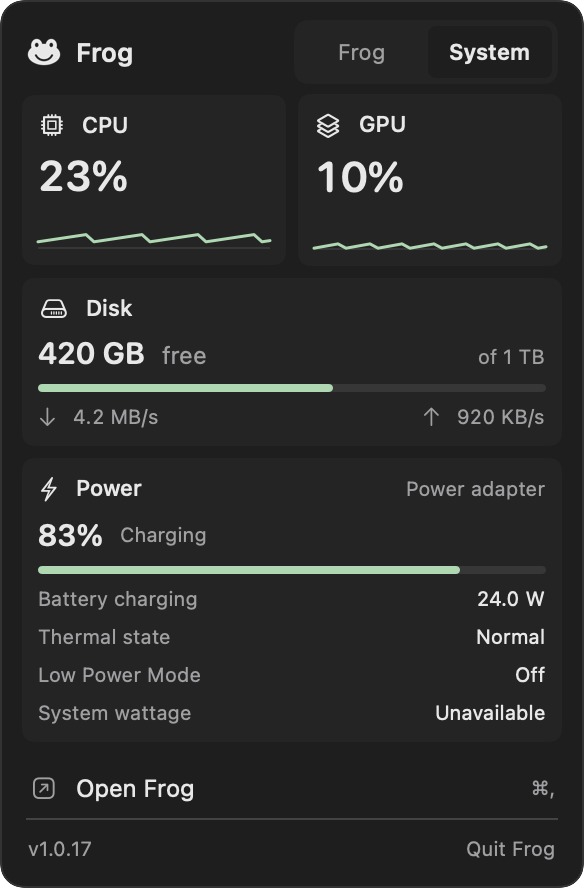
- System monitor: CPU and GPU in the menu bar, with memory, storage and battery on its own page.
- App uninstaller: App cleaner moves an app and the files it leaves behind to the Trash after you review them.
- Launcher: a command bar for apps, windows, files, settings, calculations and unit conversions.
- Dictation and writing tools: local speech-to-text and AI rewriting of selected text.
- AI usage: Claude and OpenAI plan limits and token activity in the menu bar.
A tidier menu bar
Frog’s menu-bar popup holds its tools. System monitor, AI usage and Stay awake can each add a small readout of their own when you want one, and you choose how each looks. The optional Menu bar feature hides the other icons you rarely need behind a divider.
Native, local and quiet
Frog is a native macOS app. Its toolkit features run locally without an account or any AI model, and the app sends no analytics or telemetry. Clipboard history lives in memory only; notes and scripts stay in a private store on your Mac.
Missing a utility? Add it as a plugin
If a small app you rely on has no counterpart in Frog, ask Claude Code or Codex to build it as a Frog plugin. A plugin can add a page, a menu-bar item with a popup, global shortcuts and command-bar commands, each behind a permission you approve.
Questions
Does Frog slow down my Mac?
Tools you leave off do no work at all. System monitor samples CPU and GPU every few seconds while it is on, and other readings only while its page is open.
Which macOS versions does Frog support?
macOS 14 Sonoma or later, on Apple silicon and Intel Macs. Built-in local AI models need Apple silicon.
Can I keep using my other utilities?
Yes. Turn on only the Frog tools you want and keep the rest of your setup; you can switch any Frog feature off again at any time.
What does Frog cost?
Nothing. Frog is free and open source under the MIT license, with no account.
Put ten Mac apps behind one icon
Free, native and open source. Every tool is off until you turn it on.