FreeCPU, GPU, memory and battery at a glance
A free iStat Menus alternative for the Mac menu bar
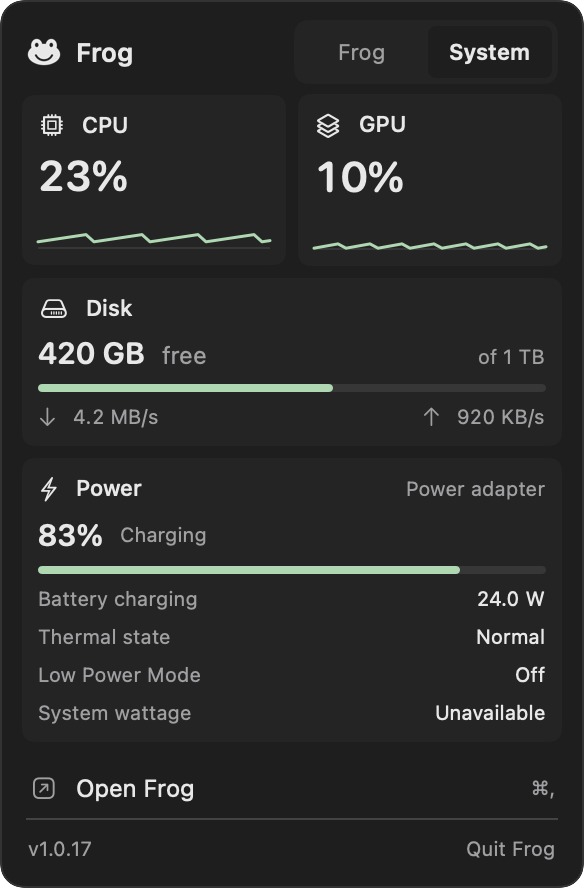
Frog’s System monitor shows CPU and GPU activity as a ten-minute graph, with memory, free storage and the battery beside it, in Frog’s menu-bar popup and on a page of its own. CPU and GPU can also get a small menu-bar item. Frog is free and open source.
- 10 mingraph of CPU and GPU; hover any moment to read it.
- 4 stylesfor the menu-bar item: steps, bars, columns or numbers.
- $0iStat Menus is $11.99. Frog is free.
Frog vs iStat Menus vs Stats
iStat Menus is the paid deep monitor, Stats the free open-source one. Frog shows what most people glance at.
| Feature | FrogFree | iStat Menus 7$11.99 | StatsFree |
|---|---|---|---|
| Price | Yes: Free | No: $11.99 one-time, $14.99 family | Yes: Free |
| Open source | Yes: MIT | No: No | Yes: MIT |
| CPU and GPU in the menu bar | Yes: Yes | Yes: Yes | Yes: Yes |
| Memory, storage, battery | Yes: Yes | Yes: Yes | Yes: Yes |
| Network, sensors, fans | No: No | Yes: Yes, with fan control | Yes: Yes |
| Weather and alerts | No: No | Yes: Yes | No: No |
| Claude and Codex usage limits | Yes: Yes | No: No | No: No |
| Launcher, windows and clipboard in the same app | Yes: Yes | No: No | No: No |
The readings you check most, without a paid licence.
What it shows
- CPU and GPU in one graph of the last ten minutes; hover to read any moment.
- Memory in use, counted the way Activity Monitor does.
- Free and total space on the startup disk, as Finder counts it.
- Battery charge and state, what the whole Mac draws in watts, and the battery temperature.
CPU and GPU in the menu bar
Turn on the menu-bar item to keep CPU above GPU next to the clock, drawn as steps, bars, columns or numbers in three colour styles. Click it for the full System view. A reading macOS does not provide shows as Unavailable rather than a guess.
Watch your Mac in a minute
- Turn on System monitor in Frog’s Features.
- Open Frog’s popup for the graph, memory, storage and battery.
- Turn on the menu-bar item and pick a style if you want CPU and GPU next to the clock.
Questions
Does Frog show network traffic or fan speed?
No. System monitor shows CPU, GPU, memory, storage and battery. A plugin can add more readings.
Does sampling slow my Mac down?
Frog records CPU, GPU and memory every five seconds, or every two with its menu-bar item on, and refreshes everything faster only while the view is open.
Is Frog cheaper than iStat Menus?
Frog is free, with no trial and no licence. iStat Menus 7 costs $11.99 for one Mac, or $14.99 for a family licence, as of November 2026.

Monitor your Mac for free
CPU, GPU, memory, storage, battery and your AI usage limits in one free app.