FreeUninstaller and system monitor, no subscription
A free CleanMyMac alternative for uninstalling apps and watching your Mac
Most people open CleanMyMac to remove an app completely or to see why the Mac feels slow. Frog does both for free: its App cleaner removes an app with the caches, settings and services it leaves behind, and its System monitor shows CPU, GPU, memory, storage and battery in the menu bar. No subscription, no scans that ask you to upgrade.
- $0CleanMyMac starts at about $40 a year per Mac.
- Trash onlyFrog moves files to the Trash and never empties it for you.
- MITOpen source, so you can read what it removes and why.
Frog vs CleanMyMac vs AppCleaner
CleanMyMac is a paid all-in-one cleaner. AppCleaner is a free uninstaller. Frog is a free toolkit with both an uninstaller and a monitor.
| Feature | FrogFree | CleanMyMacFrom $3.33/mo | AppCleanerFree |
|---|---|---|---|
| Price | Yes: Free | No: About $40 a year per Mac, free trial | Yes: Free |
| Open source | Yes: MIT | No: No | No: No |
| Uninstall apps with leftover files | Yes: With the reason for each match | Yes: Yes | Yes: Yes |
| You review every file first | Yes: Yes | Yes: Yes | Yes: Yes |
| CPU, GPU, memory and battery monitor | Yes: Menu bar and popup | Partly: Performance tools | No: No |
| System junk and cache cleanup | No: No | Yes: Yes | No: No |
| Malware scan | No: No | Yes: Yes | No: No |
| App updater | No: No | Yes: Yes | No: No |
| Launcher, clipboard and windows in the same app | Yes: Yes | No: No | No: No |
The two jobs most people buy a cleaner for, without the subscription.
Remove an app and everything it left behind
Dragging an app to the Trash leaves its caches, preferences, saved state, logs, containers and background services in your Library folders. Frog’s App cleaner finds them, quits the app if it is running, and moves the app and the files you keep ticked to the Trash. Type uninstall and the app’s name in the command bar to start.
Know why each file is on the list
Cleaners often show a long list and a big number. Frog groups each file by how sure the match is: sure matches carry the app’s bundle ID, likely ones its exact name, and possible ones only resemble it. Only sure and likely matches start ticked, and files another installed app also uses are never ticked for you.
See what is slowing your Mac down
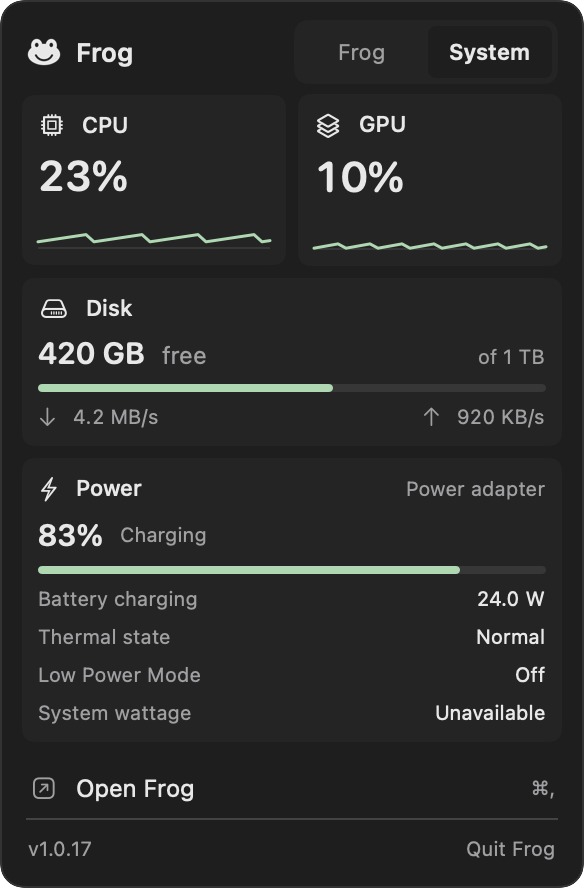
When a Mac feels slow, the useful question is what is using it right now. Frog’s System monitor draws CPU and GPU over the last ten minutes, shows memory the way Activity Monitor counts it, free storage the way Finder counts it, and the battery’s charge and draw. A small menu-bar item can keep CPU and GPU next to the clock.
No scans, scores or upgrade prompts
Frog never runs a scan in the background, shows a health score or tells you gigabytes of junk are waiting. macOS clears most caches on its own when space runs low, and System Settings → General → Storage shows what takes space. Frog removes what you ask it to, and nothing else.
Clean up without a subscription
- Turn on App cleaner and System monitor in Frog’s Features.
- Type uninstall and an app’s name in the command bar; review the list and move it to the Trash.
- Open System Settings → General → Storage to see what else takes space.
Questions
Does Frog remove system junk like CleanMyMac?
No. Frog removes an app and the files that belong to it, and shows what uses your Mac. It does not scan for system junk, malware or duplicate files.
Can I undo an uninstall?
Yes, until you empty the Trash. Frog only moves files to the Trash and never deletes them or empties it.
Is there a free version of CleanMyMac?
CleanMyMac offers a free trial but no free plan as of November 2026. Frog, AppCleaner and Pearcleaner are free uninstallers.
Is Frog safe to use?
Frog is open source under the MIT licence, notarized by Apple, and asks before every change. Files another app also uses are never ticked for you, and system items move through Finder, which asks for your password itself.

Try Frog free
One download, every tool off until you turn it on. No account, no trial, no subscription.